Home | Demos
& Downloads | Athletics | FAQs | Links |
Order & Specials | Neat
| Register | Tech
Support | Search
dissidents is proud to offer the following
audio and music software packages:
Sample WrenchTM, a sound sample editor
for Windows 95, 98, XP, etc. and Amiga
- 24 bit, 96 kHz capable - better than CD quality.
- Dozens of special functions including noise reduction and
spectral warping.
- Import/export a wide variety of file formats, MIDI/SMDI sampler
support.
- Built-in macro/batch language.
Sample Wrench
XETM, special
edition sound editor for Windows 95, 98, XP, etc.
- Many popular effects, including reverb, chorus, echo, AM,
and EQ.
- Useful functions for sample rate shifting, mono to stereo
conversions, etc.
- Great for preparing Internet audio.
- Easy to use, with an affordable upgrade to Sample Wrench
Classic or 24/96.
SXVirtualTM,
a Peavey DPM-SX series sampler controller for Windows
95, 98, XP, etc. and Amiga
- Control numerous sampling parameters not available on the
SX's front panel.
- Transfer sounds via MIDI or SMDI.
- A great MIDI/SMDI communications hub and file format
converter when used without the SX!
SpeakerSimTM, a loudspeaker CAD
package for Amiga
- Thiele-Small vented analysis.
- Closed-box analysis.
- Output to HPGL plotters, Postscript printers, or Workbench-Preferences
printers.
- Build your own driver databases.

Sample
Wrench
Sound Sample Editor
"The audio equivalent of a Swiss Army knife"
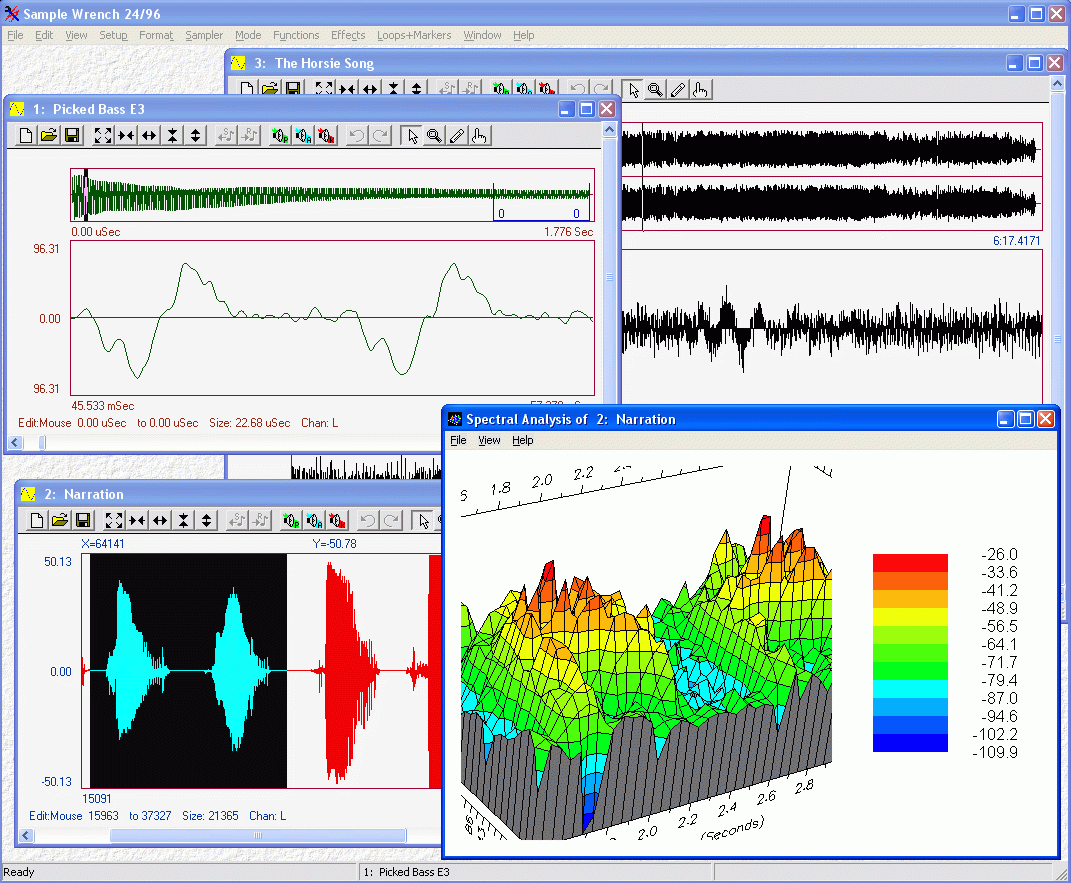
Click here for a screen shot
Version 5 for Windows 95, 98, XP,
etc.
Do you need to edit
sound files on your PC? Need to remove clicks, pops, and noise
from old recordings? Need to deal with a variety of file formats
or communicate with MIDI/SMDI samplers? Don't want to drain your
wallet, but do want reverb, extensive EQ, pitch shifting, time
compression, harmony, frequency modulation, spectral warping and
other neat effects? Want to create your own DSP functions
or specialized Plug-Ins? Bored with zombie corporate sonic tools?
Need an audio tool as versatile and flexible as a Swiss Army knife?
Can't wait to do really bizarre and strange things to audio that
you never thought were possible? Then you owe it to yourself to
download a copy of Sample Wrench! It's
The Tool for Advanced Audio WarpageTM!
Hey, don't take our word for
it- check out these reviews of
Sample Wrench
Sample Wrench is a powerful audio sample editor which works
with Windows sound cards and a variety of MIDI-based keyboard
and rack-mount samplers. Edit mono or stereo sounds with 24
bit better than CD quality and fidelity at a
price that makes the competition look silly. Numerous special
effects and processes are at your finger tips. Check it out:
- Extensive integrated on-line Help system. Get the answers
you need when you need them, with minimum fuss and bother.
- 24 bit, 96 kHz capable. Signal processing performed with
24 bit or greater resolution for the highest audio quality. Sample
rates beyond 1 MHz.
- Audition sounds at non-standard sampling rates without pitch
shifts (great for MIDI samplers!).
- Open up to 99 editors at once for those big, demanding jobs.
Special clipboard allows multiple clips (with preview, load and
save) for the utmost in cut-and-paste flexibility. Programmable
multi level Undo/Redo.
- Dozens of digital signal processing functions and effects
are ready and waiting for you. Create new sounds or alter existing
ones with flexibility, imagination, and precision. Sculpt your
sounds with tools such as: Reverb, Flange, Chorus, Echo, Amplitude
Modulation, Frequency Modulation, Rectify, Arbitrary Transfer
Functions, Invert, Reverse, Hand-drawn Amplitude Envelopes, Pitch
Shift, Time Stretch, Amplitude Compressor/ Limiter/Expander,
Bass and Treble EQ, Filters, Parametric EQ, Spectral Warp, Resynthesis,
FFT Analysis, Sample Rate Transposition, Cross Multiply, Integrate,
Differentiate, Dedicated Looping Tools, Noise Gate, Grunge, Noise
Reduction, Click & Pop Removal, Impulse (Acoustical) Modeling,
Convolution, Harmony and more.
- Effects Presets. Both internal (factory) and an unlimited
number of external (user) presets are available for you. Speed
your editing chores, recall your favorite settings quickly, even
set up your own FX library that's just a few mouse clicks away.
- Real Time Effects Preview. Hear the results of effects settings
before committing to them, immediately! No waiting for preview
files to be generated. Hear the effects of parameter changes
as you adjust them, in real-time! No more "guess-timates"
or retries.
- Zoom, scroll and pan both horizontally and vertically. Look
at any part of the waveform at any magnification (even just a
few sample points). Perfect for fine editing chores such as splicing
and looping which demand precision.
- True peak to peak detecting waveform drawing never skips
over sample data assuring you of the most accurate display possible.
You'll never miss a short peak or spike again.
- See the waveform the way YOU want to see it. Choose from
several time calibrations: seconds, samples, beats, measures,
SMPTE (all) in H:M:S:F or total frames styles. For amplitude,
choose percent, sample value, and RMS (three RMS variations).
Customize further with waveform overviews, edit status line,
XY Readout, waveform colors and fonts.
- Supports many file formats such as WAVE, AIFF, 8SVX, VOC,
AU, Sound Designer Type 1, and RAW variants. Wrench is compatible
with many other audio programs and may be used for Internet audio.
- Print and save waveform images.
- Support for dozens of MIDI based samplers such as 12 and
16 bit SDS (Sample Dump Standard) devices (Akai S1000 series,
E-Mu EMAX and Emulator series, Peavey DPM SX/SP, Roland S750
series, Yamaha TX16W, etc.), Ensoniq EPS series, Akai S612, Korg
DSS-1, Korg DSM-1, and Prophet 2000/2002. Also supports SMDI.
Use your computer as a sampler communications hub - cross load
sounds between devices, share sounds with friends, co-workers,
and clients. Bridge the "sound card - MIDI keyboard"
gap.
- Powerful macro/batch processing language. Automate complex
or repetitive tasks. Create batch processes such as bulk format
conversion, sampler upload/downloads, or sample rate translations.
You can even create your own special effects or user interface
(numerous examples included). Best of all, it's Visual Basic
compatible, the industry standard.
Plus all of the conveniences you've come to expect from a professional
program such as floating toolbars, user configurations, directory
control, and more.
System Requirements
Sample Wrench 24/96: (high res version with
32 bit floating point internal audio) Any PC compatible running
Windows 95, 98, XP, etc. with 64 Meg of RAM or more, Pentium
II class CPU or higher required.
Price $149 (includes electronic documentation).
Sample Wrench Classic: (version with 16 bit
internal audio) Any PC compatible running Windows 95, 98, XP,
etc. with 32 Meg of RAM or more, Pentium class CPU or
higher required.
Suggested retail price $99 (includes electronic documentation).
Have special needs? Custom macro/script programming is available.
Contact us for more information or a free quote.
Click here to download the latest
version (no obligation to purchase)
Click here for
a list of samplers
Version 3.1 for Amiga
Similar to Windows version except no effects presets or preview,
no integrated help, and limited to eight open editors. Scripting
uses AREXX. Support is provided for Studio 16 and Toccata cards,
along with Blue Ribbon's Triple Play and One Stop Music Shop MIDI
ports. This is the classic version using 16 bit internal audio.
Fully functional shareware.
System Requirements
Any Amiga running Amiga DOS 2.0 or higher with at least 2 Meg
of RAM, 25 MHz 68030 CPU or higher recommended.
Suggested shareware fee: $20 (includes electronic documentation).
Click here to download a copy

Sample Wrench XE
Special Edition Sound Sample Editor
Version 5 for Windows 95, 98, XP, etc.
Sample Wrench XE makes professional quality audio editing affordable
to anyone! Based on its powerful big brother, Sample Wrench XE
combines quick response, flexibility, and a host of popular effects
into one easy to use package. Highly accurate sample viewing is
yours at last. Don't settle for a crippled editor with limited
control or stale presets - take a look at what Sample Wrench XE
offers you:
- Tons of digital signal processing functions and effects are
waiting for you. Sculpt your sounds with tools such as: Reverb,
Chorus, Echo, Amplitude Modulation, Rectify, Replicate, Invert,
Reverse, Maximize, Gain, Hand-drawn Amplitude Envelopes, Bass
and Treble EQ, Filters, Sample Rate Shifting, Integrate, Differentiate,
Crossfade Looping, Mono/Stereo Conversions, and more. These aren't
static effects with just a handful of options: all parameters
are fully adjustable, creating variation after
variation after variation! Of course, you get full cut, copy,
and paste style editing too.
- Effects Presets. Both internal (factory) and an unlimited
number of external (user) presets are available for you. Speed
your editing chores, recall your favorite settings quickly, even
set up your own FX library that's just a few mouse clicks away.
- Real Time Effects Preview. Hear the results of effects settings
before committing to them, immediately! No waiting for preview
files to be generated. Hear the effects of parameter changes
as you adjust them, in real-time! No more "guess-timates"
or retries.
- Supports many file formats such as WAVE, AIFF, 8SVX, VOC,
AU, Sound Designer Type 1, and RAW variants. Wrench XE
is perfect for Internet audio!
- Support for many MIDI based samplers such as 12 and 16 bit
SDS (Sample Dump Standard) devices (Akai S1000 series, E-Mu EMAX
and Emulator series, Peavey DPM SX/SP, Roland S750 series, Yamaha
TX16W, etc.), Ensoniq EPS series, Akai S612, Korg DSS1, and Prophet
2000/2002. Also supports SMDI!
- Integrated on-line and context-sensitive help system gets
you the answers you need quickly and easily!
- Upgradeable to full Sample Wrench system. Expand your capabilities
when you need them.
- Truly affordable!
System Requirements
Any PC compatible running Windows 95, 98, XP, etc. with 32
Meg of RAM, Pentium class CPU or higher recommended.
Price: $49 (electronic documentation only).
Also check out our FAQs page for more
info.
Click here to download the latest
version (no obligation to purchase)
Click here for
a list of samplers

SXVirtual
MIDI Based Controller for the Peavey DPM-SX and
SXII Samplers
Click here for a screen shot of
the control panel
The Peavey DPM-SX and SXII are powerful and cost effective
16 bit rack mount samplers. Unfortunately, many of the fine parameter
controls on these samplers are only available through MIDI, and
not on the front panel. This leaves you with a wonderful piece
of gear, but no means to exploit it to its fullest. This is where
SXVirtual comes in. SXVirtual gives you a virtual control panel
for your DPM-SX/SXII, on your personal computer. Capabilities
and power which have been hidden from you are now available at
your fingertips. Even if you don't have an SX or SXII,
SXVirtual is extremely valuable as a general purpose file format
converter and sampler communication hub!
With SXVirtual you can:
- Access custom sample rates from 8 kHz to 48 kHz.
- Set the size of the pretrigger buffer for optimum performance.
- Examine available sampling memory in terms of sample words
or in seconds.
- Adjust the trigger threshold level. Set MIDI note on trigger
values.
- Set MIDI controller trigger values.
- Arm the DPM-SX/SXII.
- Start and Stop manually triggered sampling.
- Determine if the DPM-SX/SXII has clipped the sample.
Once a sound source has been sampled, you can transfer the
sample into SXVirtual using either MIDI, or SMDI (SCSI) which
offers a 50 to 100 fold transfer speed improvement. From there,
the sound may be viewed with great detail, using the same flexible
viewing system found on our Sample Wrench 16 bit sample editor.
Multiple waveform viewing options include overviews, numerous
choices for axis units, and virtually unlimited zoom and pan (both
horizontally and vertically). Also, sounds may be saved
to disk in a variety of formats, or previewed using the computer's
audio voices. You can even transfer samples to other compatible
samplers such as the Peavey DPM-SP and SP Plus, and units from
E-Mu, Akai, Roland, and others. With the addition of
our 16 bit sample editor, Sample Wrench, you can perform a wide
variety of functions on the sample before sending it to the sample
playback module, such as EQ, compression, time scaling, crossfade
looping, reverb, and much more.
What does all of this mean for you? Well, the bottom line is
that you can now control the DPM-SX/SXII with great precision,
trigger sampling, transfer the sound from the DPM-SX/SXII to your
computer for examination, save it to disk for archiving or later
editing, and finally transfer it to a playback module for serious
auditioning. All of this is done while you sit comfortably in
front of your computer with SXVirtual, and with SCSI, the process
is very fast!
Features Specific to Windows 95, 98,
XP, etc. Version
- Real-time VU meter lets you monitor signal strength with
accuracy.
- Special SXII extensions allow setting mono/stereo operation
and Audition/Monitor modes.
- Ability to save sounds in AU and other formats for Internet
use.
- Integrated on-line Help system.
System Requirements, Windows Version
Any PC compatible running Windows 95, 98, XP, etc. with at
least 16 Meg of RAM and a Pentium or faster processor.
An 800 by 600 pixel or greater display is recommended. A Windows
compatible MIDI card or sound card with MIDI is required. For
SMDI, a SCSI controller which conforms to the ASPI specification
is required (such as those made by Adaptec and others).
Price: $49
Click here to download the latest
version (no obligation to purchase)
Features Specific to Amiga Version
- Remote triggering of sample playback devices using the Amiga
keyboard as a MIDI keyboard.
- Direct integration of SXVirtual into Amiga Sample Wrench,
if desired.
- On disk manual.
- Can open on AmigaDOS public screens for custom environments.
- Support for the Triple Play Plus MIDI Interface and the One
Stop Music Shop card from Blue Ribbon Soundworks, LTD.
System Requirements, Amiga Version
Any Amiga running Amiga DOS 2.0 or higher with at least 2 Meg
of RAM, 25 MHz 68030 CPU or higher recommended. Standard serial
port MIDI hardware required. For SMDI, a SCSI controller which
conforms to Commodore's SCSI Direct Protocol is required (such
as the CBM A2091, i.e., scsi.device compatible). Fully
functional shareware.
Suggested shareware fee: $20
Click here to download a copy

SpeakerSim
Loudspeaker CAD
Version 2.1 for Amiga
SpeakerSim is a CAD tool designed to ease and simplify the
process of loudspeaker design. Specifically, it uses the standard
Thiele-Small models for accurate plotting of a system's low frequency
performance. This package can be used for both new system design
and the updating or customization of existing systems for maximum
performance. It is ideal for sound/audio engineers, musicians,
Hi-Fi enthusiasts, or anyone interested in the production of sound.
SpeakerSim is easy to use and produces results quickly.
Features include:
- Full mouse/Intuition interface with command key shortcuts
and 640 X 200 and 640 X 400 resolution modes.
- Full color control with your choice of any 16 colors from
the 4096 color palette.
- Configuration files let you personalize your work environment
and save system designs for future reference.
- Includes driver data files containing many popular loudspeakers
to save you time.
- Add new drivers to the data files at any time, you'll never
be out of date.
- Detailed graphs of small signal response, maximum acoustic
output, excursion limited and thermally limited output.
- Overlay any number of graphs for easy comparisons.
- '3D' type graphs with adjustable parameter variations speed
your design sequence.
- Calculation of fully adjustable 1st, 2nd, and 3rd order high
and low pass filters for assisted systems and crossover design.
- Fully multi-tasking with fast calculation and plotting times.
- Save and recall graphs in IFF format for use with desktop
publishing, paint programs, etc.
- Print to any Workbench printer, or plot using the Epson HI-80
plotter, HP7475 type plotter (HPGL), or Postscript laser printers.
- Mouse controlled XY cursor lets you find the dB/Hertz coordinates
of any point on the graph with ease.
- Calculates enclosure vent dimensions and maximally flat approximation.
- Complete, easy to follow user's manual with reference sections.
- Useful utilities included.
- Extensive AREXX implementation, and macro capability.
- Low cost.
SpeakerSim is a powerful tool for the audio professional at
an affordable price.
System Requirements
Any Amiga running Amiga DOS 2.0 or higher with at least 1 Meg
of RAM, 25 MHz 68030 CPU or higher recommended. Fully functional
shareware.
Suggested shareware fee: $20
Click here to download a copy

Home | Top
| Demos & Downloads | Athletics
| FAQs | Links
| Order & Specials | Neat
| Register | Tech
Support | Search
dissidents 10325 Woods Road, Utica NY 13502, USA. Phone
(315) 797-0343
© 2010 dissidents, all rights
reserved